Joinery Estimate Software — Quote Joinery Jobs Accurately
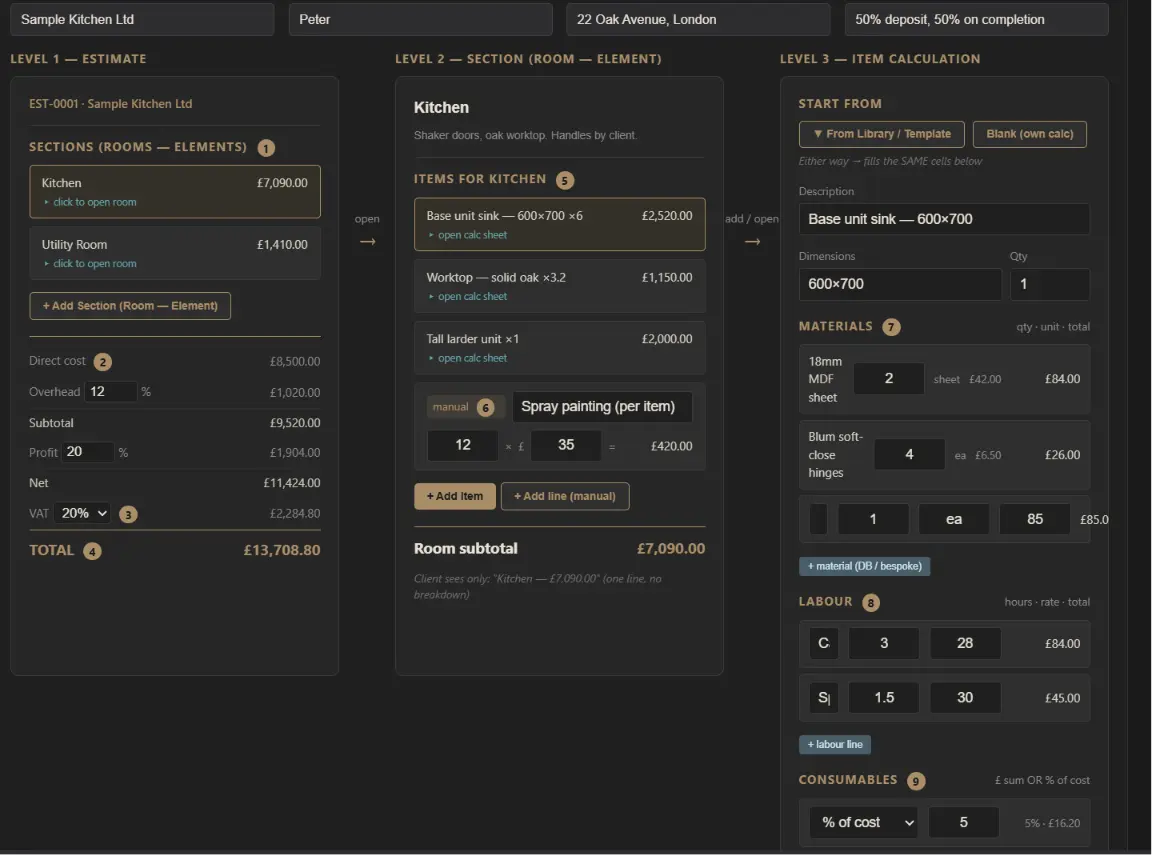
Estimating is where a joinery workshop makes or loses its money. Price the job right and the workshop simply executes a number that already works. Price it wrong — usually by underestimating labour — and no amount of efficient production will win back the margin you gave away before the first length of timber was cut.
Most workshops still estimate in spreadsheets or on a notepad. That holds up until a job is anything but a standard window, and then the gaps show: forgotten ironmongery, labour guessed from memory, markups added inconsistently, and no record afterwards of whether the price was actually right.
What good joinery estimating software gives you
- A structured way to build a quote from materials and labour — not a guess
- Consistent overhead, profit and VAT applied to every job the same way
- A reusable library of priced items so you never re-price a casement twice
- A professional, branded PDF the client actually trusts
What Joinery Estimate Software Does
At its core, joinery estimating software replaces the blank spreadsheet with a structure built for how joinery is actually priced: materials plus labour plus consumables per item, rolled up by room or area, with markups applied once across the whole job.
Joinery Core includes a built-in estimating module that does exactly this. It is not a separate tool bolted on — estimates live in the same system as your production, stock, team and finances, so a won quote flows straight to the workshop floor.
Estimate the Way Joinery Is Actually Built
A fit-out is not one number. It is rooms, and each room is a set of items — sash windows, casements, doors, a staircase, fitted wardrobes — and each item has its own materials and labour. Good estimating software mirrors that structure instead of forcing everything into one flat line.
Materials — From Stock or Custom
Pull materials straight from your stock list with the price and unit already filled in, or add a custom line by hand for one-off parts. Every material line shows quantity, unit and line total, so you can see exactly where the cost sits — timber, sheet goods, glass, ironmongery, finish.
Labour — Hours × Shop Rate
Labour is where most workshops underprice. Break each item into tasks — machining, assembly, finishing, install — with hours and a shop rate per task. The software totals it automatically, so the "invisible hours" that usually get forgotten are written down instead.
Overhead, Profit and VAT — Applied Once
Set your overhead and profit markups and they apply to the whole quote consistently — no more adding margin differently on every job. VAT is handled on top, and the total recalculates live as you edit.
Build a Reusable Joinery Library
The real time-saver is not estimating one job faster — it is never estimating the same item twice. Save a standard casement, a panelled door, a staircase once, with its materials and labour, and drop it into any future quote. The library becomes your pricing knowledge, captured instead of carried in your head.
From Estimate to Branded PDF Quote
When the numbers are right, export a clean PDF with your logo, colours, itemised rooms, payment terms and an expiry date. You control how much detail the client sees — full breakdown or room totals only. A professional document wins more work than a price written on the back of a card.
Why Not Just Use a Spreadsheet?
Spreadsheets handle the maths but not the workflow. They do not tell you which quotes are outstanding, they do not turn a won quote into a live job, and they do not connect your estimate to the materials and labour the job actually consumes. That disconnect is exactly why workshops lose track of whether they priced accurately.
Estimate Joinery Jobs With AI
Joinery Core also includes an AI estimate assistant — but it does not price on its own. You give it the brief and it does the typing. Attach a client's PDF — an enquiry, a schedule, a room-by-room spec, or a set of drawings — and the assistant reads it, pulls out the rooms, items, dimensions and quantities, and builds a draft estimate for you to price.
You stay in control of every price: the assistant prices only from your own pricing guide or a figure you give it, shows anything it works out as "suggested" for you to confirm, and saves nothing on its own. It is an assistant, not a design tool — no CAD, 3D or CNC — and it never invents a price. Without your guidance it produces nothing; the numbers are always yours.
Frequently Asked Questions
Do I need separate estimating software?
Ideally not. The best setup is workshop management software with estimating built in, so quotes, jobs, time tracking and stock all live in one place. Standalone estimating tools create data silos you then reconcile by hand.
How do I estimate work I have not built before?
Break it into parts you have built. A bespoke piece is new as a whole, but its components — frames, sashes, doors, drawers, finishing — are familiar. Price the parts from your library, add a contingency for the unfamiliar assembly, and review accuracy afterwards.
Can I use it for both quick and detailed quotes?
Yes. Use a quick single-list estimate for simple jobs, and the detailed item-by-item calc sheet when a job needs a real breakdown. Both produce the same professional PDF.
Quote accurately, win more work
Joinery Core has a built-in estimating module — materials, labour, markups, VAT and branded PDF quotes, in the same system as your production. 14-day free trial, no card.